How to decrease workload in my Kubernetes cluster at night? (and save money 🤑)
As users of cloud resources, we are concerned by the cost of resources we use. The goal is to use the minimum required resource we need, everytime, and that’s why orchestrators are very useful.
Kubernetes with its automatic mechanismcs to scale (pods and nodes autoscaling) is very good for that. Here we will not take about how it works but how we can use this in concret use case to downscale easily when we don’t need resources more.
Pods consumes CPU and Memory that are provided by machines that you pay (with money or electricity). The less pods you have the less machines you need. That’s obvious.
In company’s context, there is often development and test enviromnents that are required but not all the time, especially outside of working hours (night and weekend). These enviroment are often working all the time and so the cost is constant. The need here is to shutdown these environment while we don’t need them, easily.
How can we achieve that?
Kube Green, the dedicated operator to reduce your usage
Using Kubernetes and the power of its API, it exists several projects to achieve this goal.
My favorite is Kube-Green, for these reasons:
- It’s an operator and operator pattern in Kubernetes is awesome.
- It’s simple, the object is clear and it works about a whole namespace by default.
Ok, show me code
Let’s scale to 0 every Deployment, Statefulset and CronJob in the namespace “my-namespace” at 6PM from Monday to Friday and scale to 1 on same days at 9AM
 1apiVersion: kube-green.com/v1alpha1
 2kind: SleepInfo
 3metadata:
 4  name: working-hours
 5  namespace: <my-namespace>
 6
 7spec:
 8  weekdays: "1-5"
 9  sleepAt: "18:00" ## Come on, presentism is not a sign of effectiveness
10  wakeUpAt: "09:00"
11  timeZone: "Europe/Paris"
Using the custom resource SleepInfo, you can shutdown a whole namespace when you want.
What is really cool is you have a good way to customize which resource should be shutdown and which one should be not. Their documentation offers good examples of configuration.
Shutdown customized resources
While their examples are pretty good, I will dig inside one case using the patch feature. Operator allows to shutdown custom resources by describing how you expect the resource to be shutdown. By default it supports Deployment, StatefulSet and CronJob but with this feature you can manage all what you want!
Let’s see with how to shutdown Grafana instance managed by grafana operator.
If you leave the default configuration for the namespace, Kube Green will try to set the replicas to 0 for the deployment but it will be rejected because this deployment is managed by grafana operator.
    sequenceDiagram
    participant Kube Green
    participant Kube API
    Kube Green->>Kube API: Hey could you set replicas to 0 for Grafana deployment please?
    Kube API->>Kube Green: No I can't because it is managed by another controller
The idea is so to edit the Grafana resource that will then tells to the grafana operator to scale down and it will impact the desired deployment.
    sequenceDiagram
    participant Kube Green
    participant Kube API
    Kube Green->>Kube API: Hey could you set replicas to 0 for Grafana instance please?
    Kube API->>Kube Green: Yes, done!
    Kube API->>Grafana Operator: Hey, this grafana instance has changed. Replica count has been set to 0.
    Grafana Operator->>Kube API: Could you set the replicas count of this deployment to 0?
    Kube API->>Grafana Operator: Yes, done!
It is declared thus. It describes how to manage this kind of resources (grafana.integreatly.org Grafana) in this namespace.
 1apiVersion: kube-green.com/v1alpha1
 2kind: SleepInfo
 3metadata:
 4  name: my-grafana
 5  namespace: monitoring
 6
 7spec:
 8  weekdays: "*"
 9  sleepAt: "21:00"
10  wakeUpAt: "08:00"
11  timeZone: "Europe/Paris"
12  patches:
13    - target:
14        group: grafana.integreatly.org
15        kind: Grafana
16      patch: |-
17        - path: "/spec/deployment/spec/replicas"
18          op: "add"
19          value: 0
Do not forget to allow more permissions!
When you use the patches feature, you must allow the operator to use these resources via the Kube API. In the helm chart, it is really easy to define new permissions. Here an example:
 1kube-green:
 2  rbac:
 3    customClusterRole:
 4      enabled: true
 5      rules:
 6      - apiGroups:
 7        - grafana.integreatly.org
 8        resources:
 9        - grafanas
10        verbs:
11        - get
12        - list
13        - patch
14        - update
15        - watch
It works very well for Grafana but also for CloudnativePG operator, that is the modern way to declare PostgreSQL databases in your cluster (above all Bitnami’s politic changes).
What’s the impact?
In my @Home cluster, it shutdowns 43 pods at night that frees 30% of memory cluster. It is really great and save electricity consumption.
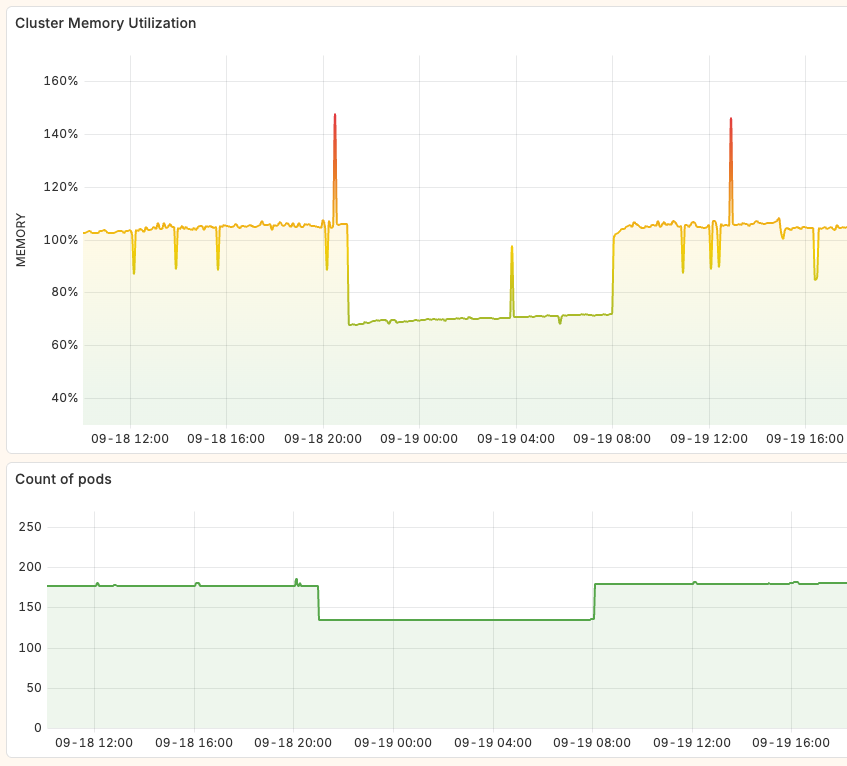
Also, I am working with the Proxmox autoscaler to remove virtual machines at night when their resources are not more required. Even if the host, Promox hypervisor, is still running, having no virtual machines in the cluster reduces the consumption: empty host runs with 5w while a node use like 20w average.
Thanks for reading! 🫶