Adminsys

7 items

My developer setup

As a computer user and as developer, I have a lot of tools. This article will reference all the tools I use. 🤪

Arch and MacOS

  • AnotherRedisDesktopManager - Redis GUI
  • Arc - Very interesting Browser (To test)
  • Bat - Improved cat
  • Cloc - Count line of code of your projects
  • Cryptomator - Encrypt your data on-the-fly
  • Dive - Tool to explore Docker image’s layers
  • Dbeaver - Universal database tool
  • Docker - Containers manager
    • MacOS - Docker for Desktop
    • Linux - Native ❤️
  • FreeTube - The Private YouTube Client
  • Fx - Beautiful JSON viewer (see JQ as alternative)
  • Git - Version control version tool
  • Gimp - Image manipulation
  • Gping - Ping tool with a graph
  • Gravit Designer - A full-featured vector graphic design app
  • htop - Improved top cli
  • Jasper - Powerful issue reader for GitHub
  • Insomnia - HTTP client (REST and GraphQL)
  • Motrix - Downloads manager
  • Nerd-fonts - Icons and fonts aggregator
    • MacOS : brew tap homebrew/cask-fonts && brew cask install font-hack-nerd-font
  • Neofetch - Display system information
  • neovim - Fork and rewrite of vim
  • nvm - Node.js version manager
  • Robot3T - MongoDB GUI
  • Responsively - Responsive browser for development
  • tldr - Beautiful man cli alternative
  • Syncthing - Continuous file synchronization program
  • Starship - Customizable prompt
  • Sublime merge - Git client
  • Übersicht - Bring widgets to MacOS
  • Virtualbox - Create virtual machines
  • vlc - Video reader
  • Vscodium - Open sourced binary of VSCode
  • Wireguard - Fast, modern and secure VPN tunnel (natively in Linux core)
  • Zettlr - Markdown editor
  • Zoxide - Faster way to nagivate your filesystem
  • 4K Downloader - Download videos from YouTube

Kubernetes

  • Helm - Kubernetes package manager
  • Kubectx - Easily switch between k8s context
  • Kubectl - CLI for kubernetes
    • MacOS: brew install kubernetes-cli
  • K3d - Launch k3s locally in Docker
  • K3s - Lightweight Kubernetes
  • K9s - Awesome tool to manage your cluster
  • Minikube - Easily launch a local k8s cluter within a VM
  • Tilt - Development with k8s

MacOS Only

  • Aldenter - Manager your MacBook’s battery
  • Alfred - MacOS tool
  • Grandperspectiv - Show disk consumption
  • iTerm2 - Terminal for Mac
  • Medis - Redis GUI
  • MonitorControl - Control your display’s brightness & volume on your Mac as if it was a native Apple Display.
  • NTFS for Mac - NTFS compatibility for MacOS
  • OpenMTP - Open source alternative to android file transfer
  • skhd - Simple hotkey daemon for macOS
  • Raycast - Fast and extendable launcher
  • Stts - A simple macOS app for monitoring the status of cloud services
  • Slowquitapps - Add a delay before closing app with CMD + Q
  • SzContext
  • UTM - Easily install and launch VMs
  • chunkwm Yabai - MacOS tiling window manager (MacOS)
  • Security - Set of awesome security tools for MacOS

Windows

Webtools

Webextensions

Read more →
setup adminsys

Jé pa l'temps #11 - Iptables

Best practice with the firewall : we block all traffic and authorize what we need and of course, RTFM !

Displaying iptables rules

sudo iptables -L --line-numbers

By default, this command only displays filter table. For displaying others tables, we have to add -t option following by nat, mangle or raw. However, filter table is the only needed table for configuring firewall.

Command options

-A CHAIN : Append a rule on the chain.

Read more →
jplt adminsys

Jé pa l'temps #10 - Local development with k3d

What is k3d ?

k3d is a CLI tool that allows you to easily start and manage a k3s local cluster. k3s is a rancher’s project that provide a Kubernetes like cluster lighter with interested features for

https://github.com/rancher/k3d

Launch local cluster

k3d create -n myCluster

With a local registry

Using Tilt’s script, it launches a local registry to accelerate local development

curl https://raw.githubusercontent.com/tilt-dev/k3d-local-registry/master/k3d-with-registry.sh | bash /dev/stdin \
  -w 2 \
  -p "80:80" \
  -p "443:443" \
  --server-arg "--no-deploy=traefik"
  • -w: define the number of worker you want (k3s node).
  • -p: published port (like Docker) ! If you expose TCP/UDP port with traefik, you have to publish port to access it.
  • --no-deploy=traefik: option to do not deploy feature. It is useful to not deploy Traefik if you have your own ingress controller.

Storage

If you have issue with pvc, verify that storageClassName is not defined as default. Indeed, with k3s only local-path storage is allowed and default className prevent from using this.

Read more →
jplt adminsys

Jé pa l'temps #8 - Data saveguard

☣️ Manual save of a Docker volume

Imported from github.

Save:

docker run --rm \
  -v volumename:/vol -w /vol alpine tar -c . > volumename.tar

Load:

docker run --rm \
  -v volumename:/vol -w /vol -i alpine tar -x < volumename.tar

⛓ Encrypt your data (before uploading them to the cloud)

With openssl ⚡️

Encryption

openssl enc -aes-256-cbc -salt \
  -in input-file.txt \
  -out output-file.txt \
  -k password

Decryption

openssl enc -aes-256-cbc -salt -d \
  -in output-file.txt \
  -out input-file2.txt \
  -k password

— — — — — — — — — — — — — — — — — — — — — —

La série « Jé pa l’temps » est une série de tutoriels rapides en mode “prise de note” pour avoir une trace de tout ce dont je ne peux me rappeler et pourquoi pas le partager à d’autre. On va à l’essentiel, laissons les jolis pavés à d’autres sites comme medium… LOL !

Read more →
jplt adminsys

Jé pa l'temps #4 - I love bash

Make a loop in bash

Array=(
  'Value 1'
  'Value 2'
  'Value 3'
)

for value in "${Array[@]}"; do
  echo $value
done

Search something

For searching something, use this awesome command

grep -rno 'something' --exclude-dir="./*/node_modules" .

--exclude-diris an option to exclude some large forlder . at the end is where you want to search, in this example i want to search where i am

⚠️ -r option tells you want to search recursively. It is absolutly powerful but it can be very slow

Read more →
jplt adminsys

Jé pa l'temps #2 - Network cheat sheet

List/discover all ip on your network

nmap -sP 192.168.1.*

Source

Monitor traffic on a port

tcpdump port 443 and '(tcp-syn|tcp-ack)!=0'

Source

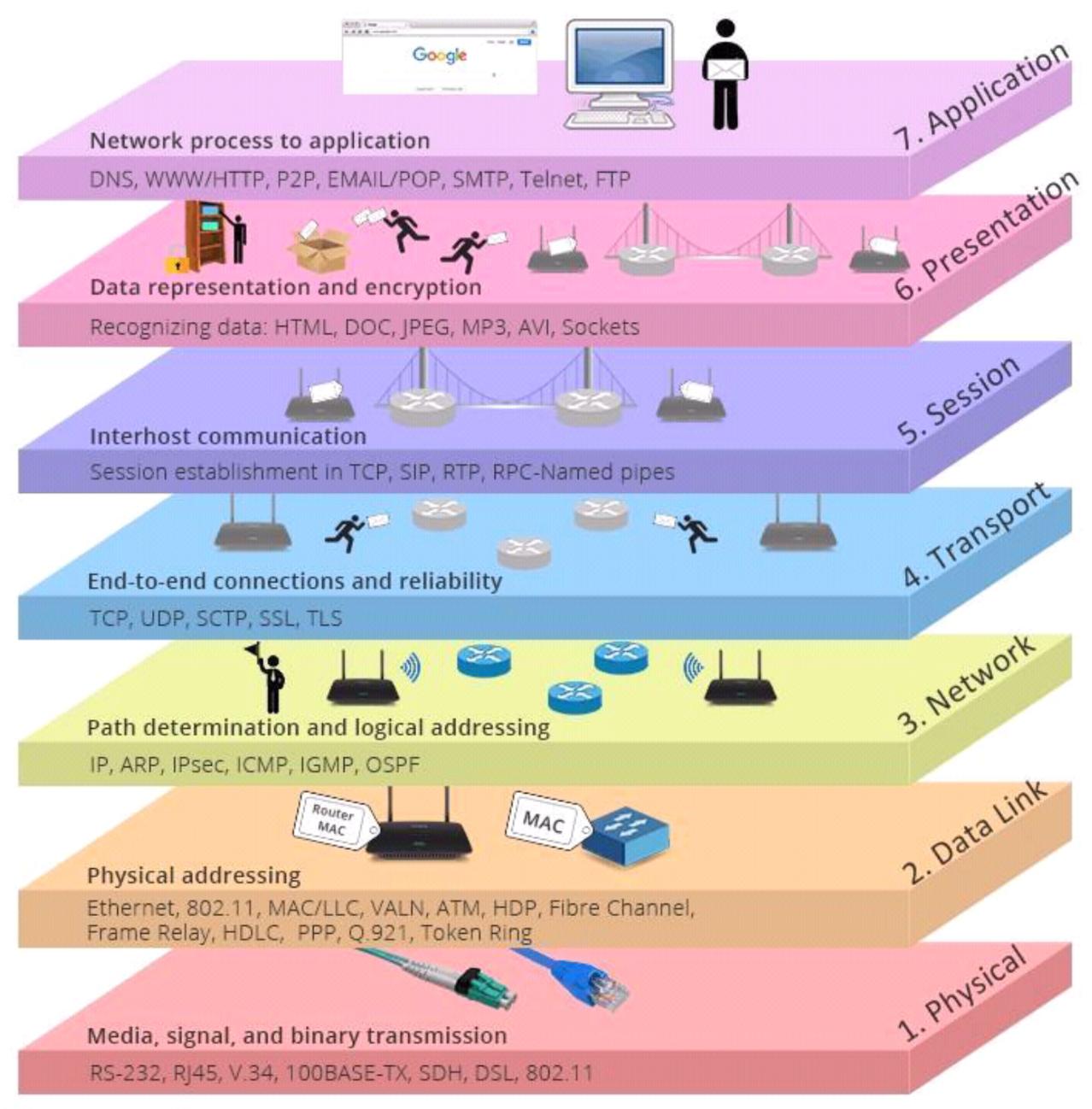
Network stack

Example image

— — — — — — — — — — — — — — — — — — — — — —

La série « Jé pa l’temps » est une série de tutoriels rapides en mode “prise de note” pour avoir une trace de tout ce dont je ne peux me rappeler et pourquoi pas le partager à d’autre. On va à l’essentiel, laissons les jolis pavés à d’autres sites comme medium… LOL !

Read more →
jplt adminsys

Jé pa l'temps #1 - Monter un VPN avec Wireguard

Explications rapides

  • Bien qu’il y ait un serveur (machine à laquelle les requêtes seront adressées), le réseau est plus un peer to peer où chaque machine a un couple de clé publique/privée et s’adresse à une machine par sa clé publique.
  • Chemins par défault pour la configuration :
    • Linux : /etc/wireguard
    • MacOs : /usr/local/etc/wireguard/
  • Reload la configuration (serveur notamment) :
    sudo systemctl reload wg-quick@wg0
    
  • Allumer et éteindre la connexion :
    • ON : wg-quick up wg0
    • OFF : wg-quick down wg0

Installation du CLI

Ressource officielle pour l’installation sur toutes les plateformes : https://www.wireguard.com/install/

Read more →
jplt adminsys