Jplt

16 items

Jé pa l'temps #33 - Clean big files in git

Basically the job is done with a command called git filter-branch

1git filter-branch --force --index-filter "git rm --cached --ignore-unmatch static/\*" --prune-empty --tag-name-filter cat -- --all
1git filter-repo --strip-blobs-bigger-than 10M

Sources

— — — — — — — — — — — — — — — — — — — — —

La série « Jé pa l’temps » est une série de tutoriels rapides en mode “prise de note” pour avoir une trace de tout ce dont je ne peux me rappeler et pourquoi pas le partager à d’autre. On va à l’essentiel, laissons les jolis pavés à d’autres sites comme medium… LOL !

Read more →
jplt git
Jé pa l'temps #32 - Cloudinit

With Proxmox

Disk auto resize on boot

  • Issue when you have several partition, if the order is disk,boot,swap; The last partition is Swap. It works well with only one big partition. Let’s try with several
    • Works with legacy partition, not LVM. LVM is another step of complexity.

Cloud init (Hostname)

There are “three configs” for the cloud init

  • Network
  • Vendor
  • User

With this command, we can see the user config setup by Proxmox.

Read more →
jplt virtual machine

Jé pa l'temps #15 - Change Java version with Arch linux

Show the current version

archlinux-java status

Set the wanted version

archlinux-java set <JAVA_ENV_NAME> # Paste the wanted version returned by the previous command

— — — — — — — — — — — — — — — — — — — — —

La série « Jé pa l’temps » est une série de tutoriels rapides en mode “prise de note” pour avoir une trace de tout ce dont je ne peux me rappeler et pourquoi pas le partager à d’autre. On va à l’essentiel, laissons les jolis pavés à d’autres sites comme medium… LOL !

Read more →
jplt Java

Jé pa l'temps #14 - Autoload correct Node.js version with nvm

These two scripts allows you to tell to your shell to autodetect .nvmrc in your Node.js projects and to load the wanted Node.js version.

With Bash

# Run 'nvm use' automatically every time there's 
# a .nvmrc file in the directory. Also, revert to default 
# version when entering a directory without .nvmrc
#
enter_directory() {
if [[ $PWD == $PREV_PWD ]]; then
  return
fi

PREV_PWD=$PWD
if [[ -f ".nvmrc" ]]; then
  nvm use
  NVM_DIRTY=true
elif [[ $NVM_DIRTY = true ]]; then
  nvm use default
  NVM_DIRTY=false
fi
}

export PROMPT_COMMAND=enter_directory

With ZSH

# place this after nvm initialization!
autoload -U add-zsh-hook
load-nvmrc() {
  local node_version="$(nvm version)"
  local nvmrc_path="$(nvm_find_nvmrc)"

  if [ -n "$nvmrc_path" ]; then
    local nvmrc_node_version=$(nvm version "$(cat "${nvmrc_path}")")

    if [ "$nvmrc_node_version" = "N/A" ]; then
      nvm install
    elif [ "$nvmrc_node_version" != "$node_version" ]; then
      nvm use
    fi
  elif [ "$node_version" != "$(nvm version default)" ]; then
    echo "Reverting to nvm default version"
    nvm use default
  fi
}
add-zsh-hook chpwd load-nvmrc

— — — — — — — — — — — — — — — — — — — — —

La série « Jé pa l’temps » est une série de tutoriels rapides en mode “prise de note” pour avoir une trace de tout ce dont je ne peux me rappeler et pourquoi pas le partager à d’autre. On va à l’essentiel, laissons les jolis pavés à d’autres sites comme medium… LOL !

Read more →
jplt Node.js

Jé pa l'temps #13 - Https server with Node.js

Code

const https = require('https');
const fs = require('fs');

const express = require('express');
const app = express();

app.get('/', async (req, res) => {
  return res.send('OK');
});

https.createServer({
  key: fs.readFileSync('./server.key'),
  cert: fs.readFileSync('./certificate.pem'),
}, app).listen(3000)

— — — — — — — — — — — — — — — — — — — — — —

La série « Jé pa l’temps » est une série de tutoriels rapides en mode “prise de note” pour avoir une trace de tout ce dont je ne peux me rappeler et pourquoi pas le partager à d’autre. On va à l’essentiel, laissons les jolis pavés à d’autres sites comme medium… LOL !

Read more →
jplt Node.js

Jé pa l'temps #12 - Quickly find a bug using git bisect

Git bisect is an useful command that helps you to quickly find a bug by dichotomy

Usage

git bisect start

Target a bad commit, usually it is HEAD (because you just realized your code is bugged)

git bisect bad HEAD

Then, give a good commit where you code works as you expect

git bisect good 429761c # Exemple of a hash commit

All is setup ! Now, you just have to test your code and then tell to git if the code is good or not.

Read more →
jplt git

Jé pa l'temps #11 - Iptables

Best practice with the firewall : we block all traffic and authorize what we need and of course, RTFM !

Displaying iptables rules

sudo iptables -L --line-numbers

By default, this command only displays filter table. For displaying others tables, we have to add -t option following by nat, mangle or raw. However, filter table is the only needed table for configuring firewall.

Command options

-A CHAIN : Append a rule on the chain.

Read more →
jplt adminsys

Jé pa l'temps #10 - Local development with k3d

What is k3d ?

k3d is a CLI tool that allows you to easily start and manage a k3s local cluster. k3s is a rancher’s project that provide a Kubernetes like cluster lighter with interested features for

https://github.com/rancher/k3d

Launch local cluster

k3d create -n myCluster

With a local registry

Using Tilt’s script, it launches a local registry to accelerate local development

curl https://raw.githubusercontent.com/tilt-dev/k3d-local-registry/master/k3d-with-registry.sh | bash /dev/stdin \
  -w 2 \
  -p "80:80" \
  -p "443:443" \
  --server-arg "--no-deploy=traefik"
  • -w: define the number of worker you want (k3s node).
  • -p: published port (like Docker) ! If you expose TCP/UDP port with traefik, you have to publish port to access it.
  • --no-deploy=traefik: option to do not deploy feature. It is useful to not deploy Traefik if you have your own ingress controller.

Storage

If you have issue with pvc, verify that storageClassName is not defined as default. Indeed, with k3s only local-path storage is allowed and default className prevent from using this.

Read more →
jplt adminsys

Jé pa l'temps #9 - Node.js hacks

🎲 Insert in an array at index

Array.prototype.insert = function (index, item) {
    this.splice(index, 0, item);
};

🪓 Delete undefined and null properties from an object

Object.entries(a).reduce((a,[k,v]) => (v === null || v === undefined ? a : {...a, [k]:v}), {})

» Example

{
  b: null,
  c: undefined,
  d: 1,
  e: '1',
  f: '',
};

// becomes
{
  d: 1,
  e: '1',
  f: '',
};

🛠️ Sort keys of an object

function sortObject(obj) {
  return Object.keys(obj).sort().reduce((result, key) => {
    result[key] = obj[key];
    return result;
  }, {});
}

🎉 Get properties which change between two objects

function getObjectDiff(obj1, obj2) {
  const diff = Object.keys(obj1).reduce((result, key) => {
    if (!obj2.hasOwnProperty(key)) {
      result.push(key);
    } else if (_.isEqual(obj1[key], obj2[key])) {
      const resultKeyIndex = result.indexOf(key);
      result.splice(resultKeyIndex, 1);
    }
    return result;
  }, Object.keys(obj2));

  return diff;
}

💛 SQL request with templating

function sql(query, args) {
  return {
      query: query.join('?'),
       args,
   };
}

sql`SELECT * FROM users WHERE username = ${username}`;

💡 Show all express route

function print (path, layer) {
  if (layer.route) {
    layer.route.stack.forEach(print.bind(null, path.concat(split(layer.route.path))))
  } else if (layer.name === 'router' && layer.handle.stack) {
    layer.handle.stack.forEach(print.bind(null, path.concat(split(layer.regexp))))
  } else if (layer.method) {
    console.log('%s /%s',
      layer.method.toUpperCase(),
      path.concat(split(layer.regexp)).filter(Boolean).join('/'))
  }
}

function split (thing) {
  if (typeof thing === 'string') {
    return thing.split('/')
  } else if (thing.fast_slash) {
    return ''
  } else {
    var match = thing.toString()
      .replace('\\/?', '')
      .replace('(?=\\/|$)', '$')
      .match(/^\/\^((?:\\[.*+?^${}()|[\]\\\/]|[^.*+?^${}()|[\]\\\/])*)\$\//)
    return match
      ? match[1].replace(/\\(.)/g, '$1').split('/')
      : '<complex:' + thing.toString() + '>'
  }
}

app._router.stack.forEach(print.bind(null, []))

⑹ Reduce error stack trace size

Error.stackTraceLimit = 6; // Set the size you want

👉 Use coverage with mocha watch

nodemon --exec nyc --reporter=lcov --reporter=text mocha

📕 Merge two pdfs together

const hummus = require("hummus");
const memoryStreams = require("memory-streams");

/**
 * Concatenate two PDFs in Buffers
 * @param {Buffer} firstBuffer
 * @param {Buffer} secondBuffer
 * @returns {Buffer} - a Buffer containing the concactenated PDFs
 */
export const combinePDFBuffers = (firstBuffer: any, secondBuffer: any) => {
  var outStream = new memoryStreams.WritableStream();

  try {
    var firstPDFStream = new hummus.PDFRStreamForBuffer(firstBuffer);
    var secondPDFStream = new hummus.PDFRStreamForBuffer(secondBuffer);

    var pdfWriter = hummus.createWriterToModify(
      firstPDFStream,
      new hummus.PDFStreamForResponse(outStream)
    );
    pdfWriter.appendPDFPagesFromPDF(secondPDFStream);
    pdfWriter.end();
    var newBuffer = outStream.toBuffer();
    outStream.end();

    return newBuffer;
  } catch (e) {
    outStream.end();
    throw new Error(`Error during PDF combination: ${e.message}`);
  }
};

🪡 Parallel requester

const EventEmitter = require('events');

class ParallelRequester extends EventEmitter {
  constructor({ maxRequests = 4, delay = 0 } = {}) {
    super();

    this.maxRequests = maxRequests;
    this.delay = delay;
    this.queue = [];
    this.results = [];
    this.executingRequests = 0;

    this._endRequest = this._endRequest.bind(this);
    this._executeNext = this._executeNext.bind(this);

    this.on('execute', this._executeNext);
  }

  add(req) {
    if (Array.isArray(req)) {
      this.queue.push(...req);
    } else {
      this.queue.push(req);
    }

    return this;
  }

  start() {
    if (this.executingRequests < this.maxRequests) {
      this.emit('execute');
    }

    return this;
  }

  end() {
    if (!this.executingRequests && !this.queue.length) {
      return [];
    }

    return new Promise((resolve) => {
      this.on('end', () => {
        resolve(this.results);
      });
    });
  }

  _endRequest() {
    this.executingRequests--;

    if (this.executingRequests < this.maxRequests && this.queue.length) {
      setTimeout(() => {
        this.emit('execute');
      }, this.delay);
    }

    if (!this.executingRequests && !this.queue.length) {
      this.emit('end');
    }
  }

  _executeNext() {
    // console.log('Executing request - ', this.executingRequests, ' currently');
    while (this.executingRequests < this.maxRequests && this.queue.length) {
      this.executingRequests++;

      const request = this.queue.shift();

      Promise.resolve(request())
        .then((data) => {
          this.results.push(data);
          this._endRequest();
        })
        .catch(() => {
          this.results.push([]);
          this._endRequest();
        });
    }
  }
}

module.exports = {
  ParallelRequester,
};

— — — — — — — — — — — — — — — — — — — — — —

La série « Jé pa l’temps » est une série de tutoriels rapides en mode “prise de note” pour avoir une trace de tout ce dont je ne peux me rappeler et pourquoi pas le partager à d’autre. On va à l’essentiel, laissons les jolis pavés à d’autres sites comme medium… LOL !

Read more →
jplt node.js

Jé pa l'temps #8 - Data saveguard

☣️ Manual save of a Docker volume

Imported from github.

Save:

docker run --rm \
  -v volumename:/vol -w /vol alpine tar -c . > volumename.tar

Load:

docker run --rm \
  -v volumename:/vol -w /vol -i alpine tar -x < volumename.tar

⛓ Encrypt your data (before uploading them to the cloud)

With openssl ⚡️

Encryption

openssl enc -aes-256-cbc -salt \
  -in input-file.txt \
  -out output-file.txt \
  -k password

Decryption

openssl enc -aes-256-cbc -salt -d \
  -in output-file.txt \
  -out input-file2.txt \
  -k password

— — — — — — — — — — — — — — — — — — — — — —

La série « Jé pa l’temps » est une série de tutoriels rapides en mode “prise de note” pour avoir une trace de tout ce dont je ne peux me rappeler et pourquoi pas le partager à d’autre. On va à l’essentiel, laissons les jolis pavés à d’autres sites comme medium… LOL !

Read more →
jplt adminsys

Jé pa l'temps #7 - Secure your Node.js

Limit rate

https://github.com/animir/node-rate-limiter-flexible#readme


— — — — — — — — — — — — — — — — — — — — — —

La série « Jé pa l’temps » est une série de tutoriels rapides en mode “prise de note” pour avoir une trace de tout ce dont je ne peux me rappeler et pourquoi pas le partager à d’autre. On va à l’essentiel, laissons les jolis pavés à d’autres sites comme medium… LOL !

Read more →
jplt node.js

Jé pa l'temps #6 - Authority certificates

Explanations

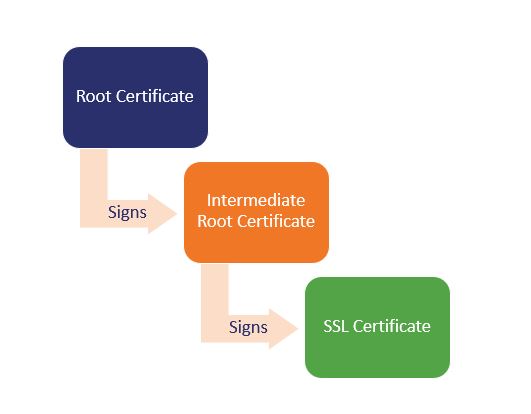
  • Certificates trust is made by the trust chains of certificates.

Example image

TL;DR Explanations

Self-signed certificates are inherently not trusted by your browser because a certificate itself doesn’t form any trust, the trust comes from being signed by a Certificate Authority that EVERYONE trusts. Your browser simply doesn’t trust your self-signed certificate as if it were a root certificate. To make your browser accept your certificate, go into your browsers configurations and add the certificate as a root certificate.

Jé pa l'temps #5 - Postgresql

Reset database without delete it

DROP SCHEMA public CASCADE;
CREATE SCHEMA public;
GRANT ALL ON SCHEMA public TO postgres;
GRANT ALL ON SCHEMA public TO public;
commit;

PSQL command

  • Show users : \du
  • Show databases : \list

Load / Dump database

# Load SQL
psql postgres://user:password@localhost:port/database --file myDumpFile.sql
# Dump Database
pg_dump postgres://user:password@localhost:port/database --file myDumpFile.sql

Generate fake data

INSERT INTO myTable (name)
SELECT 'name #' || x.id
  FROM generate_series(1,100) AS x(id);

How can load a dump to the database if port is not exposed ?

cat your_dump.sql | docker exec \
  -i {docker-postgres-container} psql -U {user} -d {database_name}

Right management

REVOKE CONNECT ON DATABASE miniflux FROM funkwhale;
REVOKE ALL PRIVILEGES ON DATABASE miniflux FROM funkwhale;
REVOKE ALL ON DATABASE miniflux FROM PUBLIC; -- By default public schema are accessible by others users, but not the data

/!\ It appears to be normal that we can not hide database existence from others users, but we can prevent them from connecting.

Read more →
jplt database

Jé pa l'temps #4 - I love bash

Make a loop in bash

Array=(
  'Value 1'
  'Value 2'
  'Value 3'
)

for value in "${Array[@]}"; do
  echo $value
done

Search something

For searching something, use this awesome command

grep -rno 'something' --exclude-dir="./*/node_modules" .

--exclude-diris an option to exclude some large forlder . at the end is where you want to search, in this example i want to search where i am

⚠️ -r option tells you want to search recursively. It is absolutly powerful but it can be very slow

Read more →
jplt adminsys

Jé pa l'temps #2 - Network cheat sheet

List/discover all ip on your network

nmap -sP 192.168.1.*

Source

Monitor traffic on a port

tcpdump port 443 and '(tcp-syn|tcp-ack)!=0'

Source

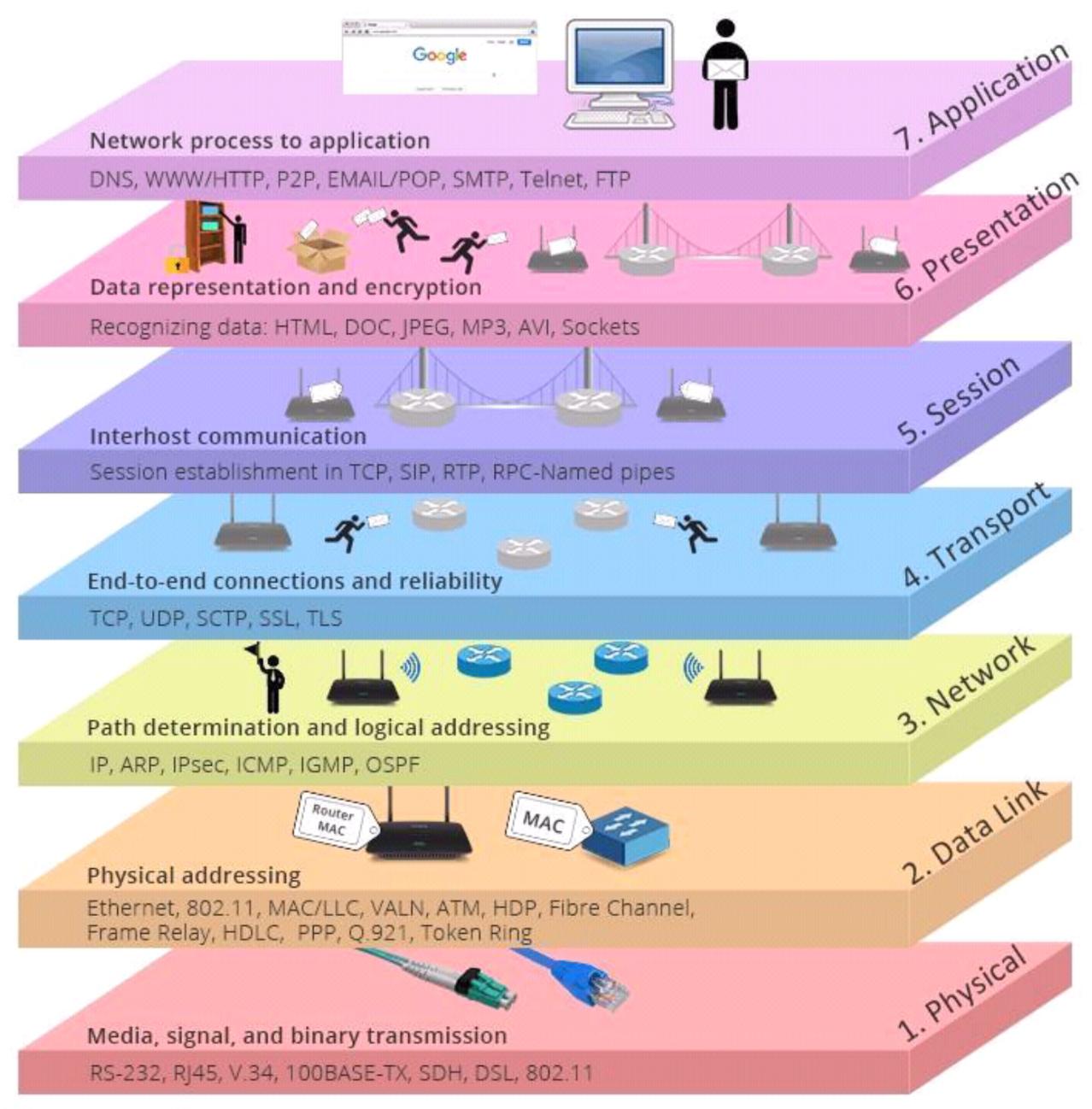
Network stack

Example image

— — — — — — — — — — — — — — — — — — — — — —

La série « Jé pa l’temps » est une série de tutoriels rapides en mode “prise de note” pour avoir une trace de tout ce dont je ne peux me rappeler et pourquoi pas le partager à d’autre. On va à l’essentiel, laissons les jolis pavés à d’autres sites comme medium… LOL !

Read more →
jplt adminsys

Jé pa l'temps #1 - Monter un VPN avec Wireguard

Explications rapides

  • Bien qu’il y ait un serveur (machine à laquelle les requêtes seront adressées), le réseau est plus un peer to peer où chaque machine a un couple de clé publique/privée et s’adresse à une machine par sa clé publique.
  • Chemins par défault pour la configuration :
    • Linux : /etc/wireguard
    • MacOs : /usr/local/etc/wireguard/
  • Reload la configuration (serveur notamment) :
    sudo systemctl reload wg-quick@wg0
    
  • Allumer et éteindre la connexion :
    • ON : wg-quick up wg0
    • OFF : wg-quick down wg0

Installation du CLI

Ressource officielle pour l’installation sur toutes les plateformes : https://www.wireguard.com/install/

Read more →
jplt adminsys